
Icon Pack Studio
Smart Launcher TeamPersonalization
4.1950.00 Reviews
- Version
- 2.5 build 005
- Installs
- 10.00M
- Age Rating
- Everyone
Screenshots
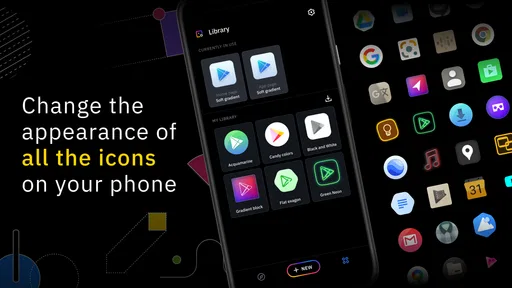
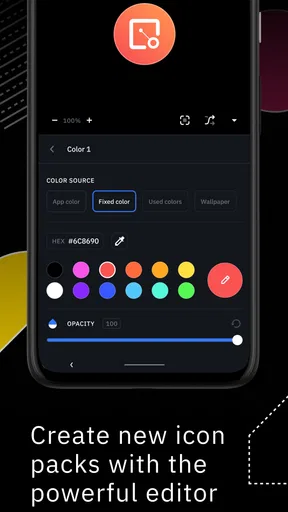
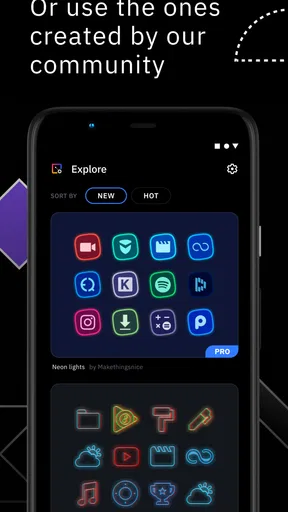
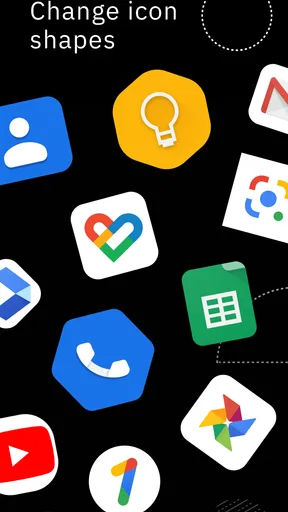
Our Review of Icon Pack Studio
 Analysis by Appyee
I tend to notice my phone’s icons most when I’m trying to get somewhere quickly: a familiar app is suddenly harder to spot once every icon has a different visual style. That is why I find icon customization more useful when it improves consistency, not just when it makes a screen look unusual. Icon Pack Studio is a personalization app from Smart Launcher Team that gives you tools to build a coordinated look rather than simply pick a ready-made theme. Its appeal is strongest if you enjoy tuning small visual details and are willing to spend some time getting the pack right.
Where connectivity enters the creative process
Designing an icon pack is not the same as changing a wallpaper: you make a series of choices, compare the results, and may revisit the design when your taste changes. That makes connectivity relevant around the edges of the experience. If I’m browsing for inspiration or deciding what look to aim for, I prefer to do that when I have a reliable connection; the actual design decisions are more about colors, shapes, layers, and how well icons read on my screen. I would not choose the app on the assumption that every part of the workflow behaves the same without a network.
For a focused session, I’d first decide on a small visual rule set—perhaps one background shape, a limited color palette, and a consistent amount of shadow—before editing individual icons. That reduces aimless tweaking and helps reveal whether the pack works as a whole. The useful test is not whether one icon looks impressive in isolation, but whether several different app symbols remain recognizable beside one another.
Useful in short sessions, best with a clear goal
This is an app I’d open during a quiet break rather than while rushing out the door. A few minutes can be enough to test a palette or adjust a shape, but a complete, consistent set takes more thought. A practical everyday example: after changing the wallpaper for a new season, I might make a pack that borrows its main colors, then check the home screen in ordinary lighting and with the apps I actually use. If the icons blend into the wallpaper or become hard to distinguish, I’d simplify the colors instead of adding more decoration.
The same approach helps if you use separate home-screen pages for work and personal apps. A shared shape can make both pages feel related, while restrained color differences can help distinguish their purposes. I would avoid relying on color alone, though: at a glance, the icon’s underlying symbol and silhouette still need to do the recognition work. That is a useful trade-off to keep in mind before spending time on elaborate effects.
What to do when the process feels stuck
Customization invites experimentation, but too many simultaneous adjustments make it hard to tell what improved the design. If I reached a point where a pack looked inconsistent, I’d go back to its basic choices and change one element at a time: first the shape, then the background, then the foreground treatment. Saving distinct designs for different moods, as the app allows, also gives you room to experiment without treating every new idea as a replacement for the previous one.
Applying a pack depends on the launcher you use, so I would check that it supports custom icon packs before investing a long session in a design. If icons do not change as expected, the launcher’s own selection and application steps are the first place I’d look; compatibility is part of the experience, not a flaw that a graphics editor can solve. Users who want a guaranteed one-tap change across any home screen may find that extra step frustrating.
Keeping the experience data-conscious
I would treat this as a visual editor, not as a reason to keep a connection active throughout every design session. A sensible routine is to plan the look, make adjustments in one focused sitting, and leave browsing or other connected activity for when it is convenient. I would also avoid assuming that a design or workflow will be available in exactly the same way in every network condition; if uninterrupted access matters to you, try the parts you rely on in your usual setting before building a whole routine around them.
There is a cost consideration too. The app is free to download, with optional in-app purchases priced from $0.99 to $11.99 per item. I’d start with the available editing experience and decide whether a paid option solves a real need before spending. That is especially sensible if your goal is simply to make one restrained pack rather than keep exploring every possible style.
Who will enjoy it, and who may prefer another route
Icon Pack Studio suits people who want more control than a standard launcher theme offers and who enjoy making a phone feel coherent. It can also suit someone who has a particular wallpaper or color scheme in mind and wants the icons to fit it, instead of searching through finished packs until one is close enough. The editor’s layers, shapes, gradients, and color adjustments give those users room to work toward a specific result.
If you only want a quick makeover, a ready-made icon pack or a launcher’s built-in theme options are likely the easier choice. Those alternatives reduce design decisions, though they offer less room to tune a pack around your own preferences. I’d also skip this app if you rarely notice icons, dislike iterative visual editing, or need a workflow that avoids launcher compatibility checks. Its current version is 2.3 build 004 and it requires Android 7.0 or later, so it is an Android option rather than an iOS app; that distinction matters if you are choosing for an Apple phone.
For context, it has a 4.2 average from around 18,000 ratings, and more than 5 million installs. It is rated for Everyone. Those figures suggest a widely used personalization tool, but they cannot tell you whether its design approach suits your taste; a short hands-on trial is a better way to answer that.
Have you ever found yourself endlessly scrolling through the same old app icons on your phone and wishing for a fresh look? Well, let me introduce you to Icon Pack Studio. This app is like a magic wand for your phone's interface, letting you create and customize your own icons with ease.
What Is Icon Pack Studio?
So, what's the deal with Icon Pack Studio? It's an app that allows you to design your own icons from scratch or tweak existing ones to match your style. Whether you're feeling artsy or just want a coherent theme across your apps, this tool is a game-changer. And yes, it's available for both Android and iOS, so no one's left out!
Getting Started: First Impressions
Jumping into Icon Pack Studio is like entering a playground for your creativity. The interface is super intuitive, with a clean layout that doesn't overwhelm you with options right off the bat. You start by choosing an icon pack to modify or create a new one from scratch. It's as simple as tapping a few buttons and letting your imagination run wild.
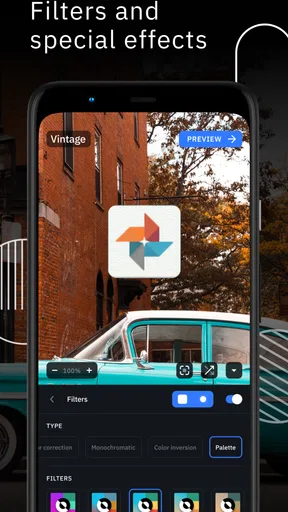
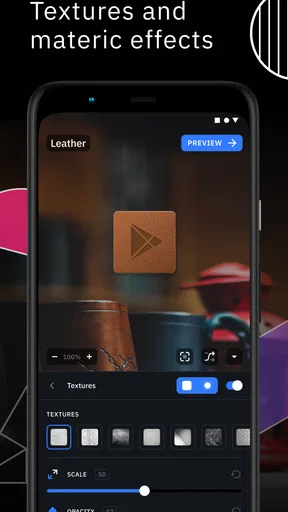
The first thing I noticed was the extensive library of templates and elements available. From gradients to textures, the options are pretty impressive. You can adjust colors, shapes, and even add shadows to your icons. It's all about making your phone truly yours.
Design Features: Dive Into Creativity
Now, let's talk about the juicy part: the design features. Icon Pack Studio gives you a ton of tools to play with. You can choose from various shapes like circles, squares, or even free-form designs. The color palette is vast, and for those who are particular about their shades, you can even input exact color codes.
One of my favorite features is the ability to add layers to your icons. This means you can stack different elements, like a background texture with a foreground design, to create something truly unique. And if you're into gradients, you're in luck. The gradient editor lets you customize everything from linear to radial gradients, giving your icons a professional touch.
Putting It All Together: Customization Galore
Once you've got your icons looking just right, applying them is a breeze. The app integrates smoothly with most launchers, so you can swap out your old icons in seconds. If you're using a launcher that supports custom icon packs, you just need to select your pack, and voilà! A brand new look for your home screen.
For those who love to switch things up frequently, Icon Pack Studio makes it easy to save multiple designs. You can create different packs for different moods or themes and switch between them without losing any of your work. It's a neat way to keep your phone's appearance fresh and exciting.
Performance and Usability
In terms of performance, Icon Pack Studio runs smoothly without any noticeable lag or crashes. The app is well-optimized, ensuring that even when you're working on complex designs, everything stays responsive. The developers have done an excellent job of balancing a feature-rich app with a seamless user experience.
Usability is top-notch. Whether you're a design novice or a seasoned artist, the app guides you through each step without holding your hand too much. The learning curve is gentle, and there's a helpful tutorial if you ever get stuck.
Final Thoughts
All in all, Icon Pack Studio is a fantastic app for anyone looking to personalize their phone to the next level. It's packed with features that cater to both casual users and design enthusiasts. The ability to create, customize, and apply icon packs with such ease makes it a must-have for anyone tired of the default look of their apps.
So, if you're ready to give your phone a makeover, download Icon Pack Studio and start creating your masterpiece. Trust me, once you see your brand-new icons on your home screen, you'll wonder how you ever lived without it!
Privacy and Permissions
See what permissions an app requests and how it handles your data.
- Photos/Media/Files
- modify or delete the contents of your USB storage
- Storage
- modify or delete the contents of your USB storage
- Other
- view network connections, full network access, run at startup, prevent device from sleeping, install shortcuts, read Google service configuration
Verdict
Strengths of Icon Pack Studio
- Highly customizable icon designs.
- User-friendly interface.
- Large library of templates.
- No ads in the free version.
- Supports most popular launchers.
Limitations of Icon Pack Studio
- Limited features in free version.
- Some icons may not match themes.
- Occasional slow performance.
- No direct icon pack sharing.
- Requires creative skills for best results.
Other Releases by Smart Launcher Team
View All
Smart Launcher 6 ‧ Home Screen
Personalization4.5
Similar Picks in This Category
View All
Microsoft SwiftKey AI Keyboard
SwiftKey4.3

Wallpapers
Google LLC4.1

Zedge™ Wallpapers & Ringtones
Zedge4.7

Yandex Browser with Alice AI
Direct Cursus Computer Systems Trading LLC4.3

Ringtone Maker:create ringtone
Big Bang Inc.4.7

Fonts Keyboard
Fonts Keyboard3.9
Frequently Asked Questions
What is Icon Pack Studio, and how does it work?
Icon Pack Studio is a versatile application that allows users to create and customize their own icon packs for Android devices. It provides a user-friendly interface with various editing tools, enabling you to design icons that match your personal style. Once created, these icons can be applied using compatible launchers to give your device a unique look.
Is Icon Pack Studio compatible with all Android devices?
Icon Pack Studio is compatible with most Android devices, but its functionality depends on the launcher you are using. Popular launchers like Nova, Apex, and Smart Launcher support custom icon packs created by the app. Ensure your launcher supports icon customization for the best experience.
Does Icon Pack Studio require any special permissions on my device?
Icon Pack Studio requires standard permissions to function properly, such as access to storage for saving and applying icon packs. It may also need permission to access your device’s settings to integrate with the launcher. The app is designed to respect user privacy and only requests necessary permissions.
Can I share my custom icon packs with others using Icon Pack Studio?
Yes, Icon Pack Studio allows you to share your custom icon packs with friends or the wider community. You can export your designs and distribute them as standalone icon packs, making it easy for others to download and use your creative work on their own devices.
Is there a cost associated with using Icon Pack Studio?
Icon Pack Studio offers a free version with basic features, allowing you to create and apply custom icon packs. For additional tools and premium designs, an in-app purchase option is available. The free version is robust enough for casual users, while the premium version caters to those seeking advanced customization options.
